
Learn / DaVinci Resolveupdated for TryUncle pricing (July 2026)
TryUncle Pricing Plans: What It Actually Costs
Quick answer
TryUncle costs $34.99 a month, cancel anytime, with a 14-day no-questions-asked refund. There's one plan, no free tier, no annual discount. Check TryUncle for the current rate.

You want one number before you commit to anything else on this page. Here it is: $34.99 a month. One plan. No tiers to compare, no annual discount to calculate, no free version hiding behind a paywall three clicks in. That's the whole pricing model, and everything below is the detail: what the subscription includes, how the refund works, and how the number stacks up against what you'd pay for a Resolve course subscription instead.
How much does TryUncle cost?
One number, one plan. Here's the whole pricing table, nothing hidden below the fold.
| Plan | Price | Terms |
|---|---|---|
| TryUncle | $34.99/month | Cancel anytime, 14-day no-questions-asked refund |
TryUncle has never been free, and it isn't marketed that way. There's no freemium tier, no limited free plan with a handful of questions a month, no "free forever" version with ads or a usage cap. It's a paid macOS app from day one. If you want the full mechanics of what the subscription actually buys you, watching your screen, pointing at controls live inside Edit, Color, and Fusion, that's covered in depth in what TryUncle actually is. This page stays narrowly on the number.
Why is there only one plan?
Because the product doesn't gate anything. There's no tier ladder where a cheaper plan gets fewer questions or a pricier one unlocks extra pages of Resolve, and there's no annual-versus-monthly split to run a spreadsheet on. Every subscriber gets the same app, the same coverage of the Edit, Color, and Fusion pages, and the same cancel-anytime billing at the same $34.99 a month.
That's unusual enough in 2026's subscription-software landscape to be worth naming: most tools in this space publish two to four tiers precisely so the middle one looks reasonable. TryUncle's pricing decision is the opposite kind of simple. The only real question a single flat plan leaves you with is whether the product itself is worth the number, which is what the rest of this page is for.
Is there a free trial or a free version of TryUncle?
No, and it's worth saying plainly instead of letting the word "trial" do work it doesn't do here. There's no free tier, no seven-day trial that starts a countdown before your card gets charged, and no watered-down free version with fewer features. The download itself is free, you install the app and sign in with Google at no cost, but the moment you want Uncle to actually watch your screen and answer a question, you're subscribing.
What TryUncle offers instead is a 14-day, no-questions-asked refund if Uncle doesn't help you get unstuck in your first week (source: TryUncle's FAQ). Functionally, that behaves more like a trial with your money temporarily at risk than a trial with a feature cap: you pay, you use the full product for up to two weeks, and if it didn't earn its keep, you get the charge back without having to justify the request. The tradeoff is real, though. A free trial never touches your card. A refund window does, briefly, and you're trusting the refund process to actually work the way the FAQ describes it.

What do you actually get for $34.99 a month?
Everything. There's no feature gate anywhere in the plan, so the full list below is what every subscriber gets.
| What's included | TryUncle ($34.99/mo) |
|---|---|
| Screen-aware assistance across Edit, Color, and Fusion | Yes |
| Talk, Check, and Type input methods | Yes |
| Live pointing (hand-drawn box or flying cursor) | Yes |
| Delivery-spec guidance (export settings) | Yes |
| Multi-monitor support | Yes |
| macOS only, no Windows or Linux build | Applies |
| Cancel anytime | Yes |
| 14-day no-questions-asked refund | Yes |
If you want the full breakdown of what Uncle actually does with those permissions, the three ways to ask it a question, and what it can and can't see on your screen, that's covered separately in what TryUncle actually is. The short version for a pricing page: there's one product, one feature set, one monthly number.
Does the price change based on how much you use TryUncle?
No. It's a flat monthly rate, not a usage-based or credit-based model. TryUncle doesn't publish a question cap, a per-session charge, or an overage fee anywhere in its FAQ or pricing copy. You pay the same $34.99 whether Uncle answers one question that month or fifty.
That's worth naming because a lot of AI products in 2026 have moved to metered pricing, credits that run out mid-month, or tiered plans gated by usage volume. TryUncle isn't structured that way, at least not as of this writing. If that changes, it would be a material shift to the plan structure covered on this page, not a minor update, and this guide will note it here if it happens. For now, the practical implication is simple: a freelancer grading fifteen shots a week and a hobbyist asking one question every other Sunday pay the identical rate.
What's TryUncle's refund and cancellation policy?
Two separate things, and it's worth keeping them apart because they answer different questions.
Cancellation stops future billing. TryUncle's FAQ states plainly that you can cancel anytime (source: TryUncle's FAQ), with no minimum term, no annual commitment hiding behind the monthly framing, and no retention call to sit through. You cancel, your current billing period runs out, and you're not charged again. Nothing in the public documentation describes a downgrade path or a pause option, just cancel and, if you come back later, resubscribe at whatever the current rate is at that point.
Refunds are narrower and time-boxed. The 14-day, no-questions-asked window applies if Uncle doesn't help you get unstuck in your first week (source: TryUncle's FAQ). That's a specific commitment, "no-questions-asked," which is stronger language than the vaguer "satisfaction guaranteed" a lot of software uses, and it means you shouldn't need to build a case for why you want the money back. It doesn't extend indefinitely, though. Cancel in month three because the tool stopped fitting your workflow, and you're not getting that month's charge back. You're just not billed for month four.
| Situation | What happens |
|---|---|
| You cancel within 14 days of subscribing | Eligible for a full, no-questions-asked refund |
| You cancel after 14 days | Subscription ends, current billing period runs its course, no refund for time already paid |
| You want to pause instead of cancel | Not offered as a documented option; cancel and resubscribe later is the only path described |
| You resubscribe after cancelling | You rejoin at whatever rate is current at that time |
Billing itself runs through Whop, a third-party subscription commerce platform, rather than a custom checkout TryUncle built and maintains itself (source: TryUncle's privacy policy). That's a normal setup for a small software company. It also means billing disputes, failed card charges, and receipt questions typically route through TryUncle's support contact rather than something you can self-serve entirely inside the app.

How does TryUncle's price compare to a DaVinci Resolve course subscription?
This is the comparison most people actually want, so here it is with real numbers pulled from each platform's own pricing page rather than a guess.
| Platform | Typical monthly cost | What you're actually paying for |
|---|---|---|
| Blackmagic free training | $0 | Official, structured fundamentals, no live help on your own footage |
| Skillshare | ~$13.99/month billed annually, $17.99 to $32/month billed monthly | Unlimited access to a library of pre-recorded creative classes |
| Udemy Personal Plan | ~$14 to $20/month billed annually, up to ~$32/month billed monthly, or individual courses from $9.99 to $199.99 | A curated library of pre-recorded courses, subscription or a la carte |
| Coursera | $59/month or $399/year for Coursera Plus, individual courses $29 to $99 | University-backed courses and verified certificates |
| LinkedIn Learning | Roughly $20 to $40/month | Career and software skills tied to your professional profile |
| Pluralsight | $29 to $45/month ($299 to $499/year) | Developer, cloud, and IT-certification-aligned courses |
| MasterClass | $120 to $240/year | Broad, celebrity-taught inspiration, not hands-on skill practice |
| School of Motion | ~$265 to $332 per course, or an All-Access subscription plan | Motion design and After Effects courses built by working motion designers |
| TryUncle | $34.99/month | A live tutor watching your own project, not a video library |
Sources for the course-platform figures: Skillshare's own pricing page, Udemy's own pricing page, Coursera's compare-plans page, LinkedIn Learning's compare-plans page, Pluralsight's individual pricing page, MasterClass's membership FAQ, and School of Motion's pricing announcement, all linked in the sources for this post.
Read the table straight down and the pattern is obvious: TryUncle's $34.99 a month sits at the top of what a course subscription typically costs. It's not a bargain-bin price relative to that category, and the number alone doesn't tell you whether it's the right buy. What it buys is genuinely different: every other row in that table hands you a video library you watch and then have to translate onto your own project yourself. TryUncle watches the project directly. Whether that difference is worth the price to you personally is a judgment call this table can't make for you, and it's covered in more depth, including the learning-science research behind why that difference matters, in the best way to learn DaVinci Resolve.
One more number worth having in your head before you compare on price alone: Udemy agreed to a $4 million class-action settlement over allegations it advertised inflated "original" prices next to steep discounts, covering purchases between August 2017 and April 2023 (source: Class Central). The company didn't admit wrongdoing, and plenty of good instructors are still on the platform, but it's a reason to treat a course marketplace's list price as theater and its actual sale price as the real number, the opposite problem from TryUncle's flat, undiscounted rate, which is the same number whether you sign up today or during some hypothetical future sale.

How does TryUncle's price compare to just buying DaVinci Resolve Studio outright?
Differently enough that they shouldn't really be compared as competing purchases, though people ask the question often enough that it's worth answering directly.
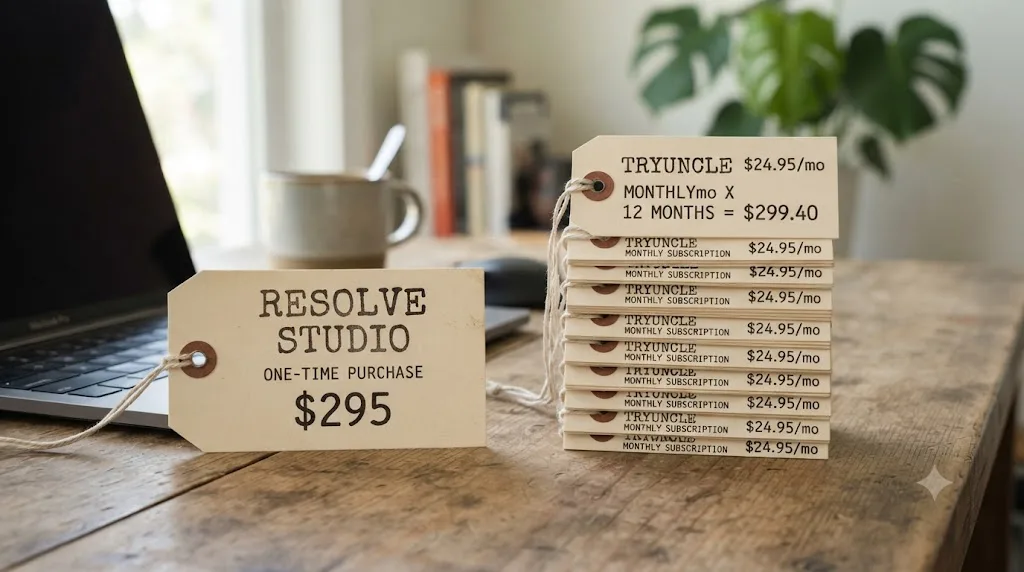
DaVinci Resolve Studio is a one-time $295 purchase, no subscription, no annual renewal fee, and it unlocks Neural Engine features like Magic Mask, Speed Warp, and Smart Reframe that the free edition of Resolve doesn't have (source: blackmagicdesign.com/products/davinciresolve/studio). That's the software itself. TryUncle is a separate subscription that sits on top of whichever edition of Resolve you're already running, free or Studio, and teaches you how to use it. They answer different questions: Studio is "which version of the app do I own," TryUncle is "how do I actually operate it well."
Run the math anyway, because the comparison is a fair one to want. A full year of TryUncle costs $419.88, roughly 40% more than Studio's one-time $295 price. A year of TryUncle runs past the one-time price of the entire application it teaches you to use. That's not a criticism of either product. A one-time software license and a recurring tutoring subscription solve genuinely different problems, and Resolve's free edition is already a full professional NLE and colorist tool without spending a cent on Studio at all. But it's a real number worth having in your head before you subscribe to anything, and it's the same honest framing the pricing FAQ over on what TryUncle actually is uses too.
Is TryUncle's price actually worth it?
Whether it's "worth it" depends on the same question this guide keeps returning to across every TryUncle post: are you the kind of editor who gets stuck mid-project on your own footage more than you get stuck at the very beginning of learning the software. TryUncle makes a specific financial argument on its own site, worth repeating with real skepticism attached rather than taken at face value. It frames color grading work as adding "$200 to $500 per video" to a freelancer's invoicing and motion graphics work as adding "$300 to $800 per project," positioning one paid graded delivery as covering more than a year of the subscription (source: TryUncle's site). One of TryUncle's own published testimonials makes the same point in a single line:
"I quoted motion graphics I had never built. Uncle walked me through Fusion node by node. Invoice paid."
- Marcus T., corporate video editor
That's a vendor-published testimonial, not an independently verified case study, so weigh it the way you'd weigh any company's own selected quote, as an example of a best-case outcome rather than a guarantee of your own results. The ROI argument only holds if you're actually billing for the work TryUncle helps you finish. If you're editing for yourself, a hobby project, a family video, nobody's invoice, the "it pays for itself" framing doesn't apply to you at all, and the honest comparison is against the course-subscription table above, not against freelance day rates.

Who is TryUncle actually worth it for, and who should skip it?
Not everyone reading a pricing page should subscribe today, and it's more useful to say so plainly than to pretend the answer is always yes.
| Situation | Worth subscribing? | Why |
|---|---|---|
| You bill clients for color grading or motion graphics work in Resolve | Likely yes | The ROI argument from TryUncle's own site (one paid delivery covers over a year) plausibly applies to you specifically |
| You're a hobbyist editing for yourself, no invoices involved | Maybe, but weigh it against free options first | Blackmagic's own free training solves a real chunk of the same problem at no cost |
| You're on Windows or Linux | No | TryUncle is macOS only; the price doesn't matter if the platform doesn't run at all |
| You edit mostly offline, spotty wifi, on a plane, in a basement studio | No, or wait until connectivity is reliable | Uncle needs an internet connection to function at all, no offline mode |
| You want a structured, sequential curriculum with a certificate | No, look at a course platform instead | TryUncle answers the question you have right now; it doesn't teach a fixed syllabus, and it issues no certificate |
| You're not sure yet and want to test it risk-free | Yes, use the 14-day refund window as your real trial | The refund policy exists specifically to let you test this without committing past two weeks |
| You've already decided course platforms don't fit how you actually learn | Yes | Live correction on your own project is the specific thing a video library can't do |
If a fixed weekly syllabus with graded assignments is what actually keeps you accountable, a subscription platform is probably the better fit for your money, and the full breakdown of who Udemy, Skillshare, Coursera, and the rest of that market suit best is in our Udemy alternatives roundup.

Is there an annual plan or any other discount?
Not right now. Every course platform in the comparison table above offers some version of "pay yearly, save a chunk," and TryUncle currently doesn't: there's one monthly rate, billed monthly, and no published discount of any kind. If an annual option ever appears, it would lower the effective monthly cost without changing the single headline number this page is built around.
The practical takeaway is the same one this page keeps circling back to: check TryUncle directly before you commit to a number, because a live pricing page updates faster than any third-party guide can track it. Everything on this page reflects TryUncle's published pricing and FAQ as of this writing, not a guarantee of what the page says when you're reading this.

What's the actual verdict on TryUncle's price?
If you already know you learn Resolve better by doing than by watching, and you'd rather have a control pointed at on your own screen than pause a video and hunt for it yourself, $34.99 a month sits at the top of what the course platforms charge, and it buys a structurally different thing: a tutor that watches your project instead of a library you watch. If you're not sure yet, the 14-day refund window is the honest way to find out without much risk. And if you're on Windows, need a certificate, or genuinely learn better from a structured video curriculum, no price on this page changes that answer, and Blackmagic's own free training or one of the platforms in our Udemy alternatives guide is the better place to spend the money instead.
Either way, don't take a blog post's word for the exact current number. Pricing pages move. Go check TryUncle for the current price today.
Frequently asked questions
- How much does TryUncle cost right now?
- TryUncle is $34.99 a month. There's one plan, billed monthly, cancel anytime. Check TryUncle for the exact current rate.
- Is there a free trial or a free version of TryUncle?
- No. TryUncle has never had a free tier or a time-limited free trial. What it has instead is a 14-day, no-questions-asked refund if Uncle doesn't help you get unstuck in your first week, which works like a money-back trial rather than a feature-capped one.
- Does TryUncle charge more if I use it a lot?
- No. It's a flat monthly rate with no usage metering and no per-question charges published anywhere. You pay the same $34.99 whether you ask Uncle one question a month or fifty.
- Can I cancel TryUncle anytime?
- Yes. TryUncle's own FAQ states you can cancel anytime, with no minimum term and no retention call. Cancelling stops future billing. It doesn't retroactively refund charges outside the 14-day refund window.
- Does TryUncle cost more than a DaVinci Resolve course subscription?
- It sits at the upper end of that range. Skillshare runs about $13.99 to $32 a month depending on billing cycle, and Udemy's Personal Plan runs roughly $14 to $32 a month plus per-course pricing up to $199.99. TryUncle's $34.99 a month sits at the top of that range.
- Is TryUncle worth it compared to just buying DaVinci Resolve Studio outright?
- They're not really substitutes for each other. Resolve Studio is a one-time $295 purchase with no subscription. TryUncle is a subscription layered on top of whichever edition of Resolve you already use, free or Studio. A year of TryUncle costs a bit more than Resolve Studio itself, so weigh them as two separate decisions, not competing options.
Sources
- TryUncle
- TryUncle FAQ
- TryUncle Privacy Policy
- DaVinci Resolve - Studio (Blackmagic Design)
- DaVinci Resolve Training (Blackmagic Design)
- Skillshare Pricing
- Compare Udemy Plans and Pricing
- Udemy's Refund Policy - Udemy Support
- Udemy Agrees to Pay $4 Million Settlement Over Deceptive Pricing Practices (Class Central)
- Coursera Pricing and Plans
- LinkedIn Learning - Compare Pricing & Plans
- Pluralsight Individual Pricing Plans
- About MasterClass Membership Plans (MasterClass Help Center)
- School of Motion: Big News About Our Course Prices
Learn by doing, not watching
Stop translating tutorials to your timeline.
TryUncle stays beside Resolve on Mac and Windows. When you ask, Uncle sees your screen and points at the exact control you need. No hunting through tabs, timestamps, or mismatched tutorials.
Meet TryUncleKeep reading
 GuidesJul 12, 202637 min read
What Is TryUncle? The Assistant Built Into DaVinci Resolve
TryUncle is a macOS assistant that watches your DaVinci Resolve screen and points at the exact control live, so you learn by doing, not watching.
 GuidesJul 12, 202641 min read
The Best Way to Learn DaVinci Resolve (What the Research Says)
Guided, hands-on practice inside DaVinci Resolve beats video courses and MOOCs. Here's the learning-science research behind why, and how to apply it.
 ComparisonsJul 8, 202633 min read
12 Best Udemy Alternatives in 2026 (Free and Paid)
We compared 12 Udemy alternatives, free and paid, to help you pick the right one for what you're actually trying to learn.